
Solving the Dual-Write Problem with Spring Boot Starter Outbox
Master the Transactional Outbox pattern with spring-boot-starter-outbox — atomic database writes + reliable message broker publishing, no dual-write inconsistencies
On this page
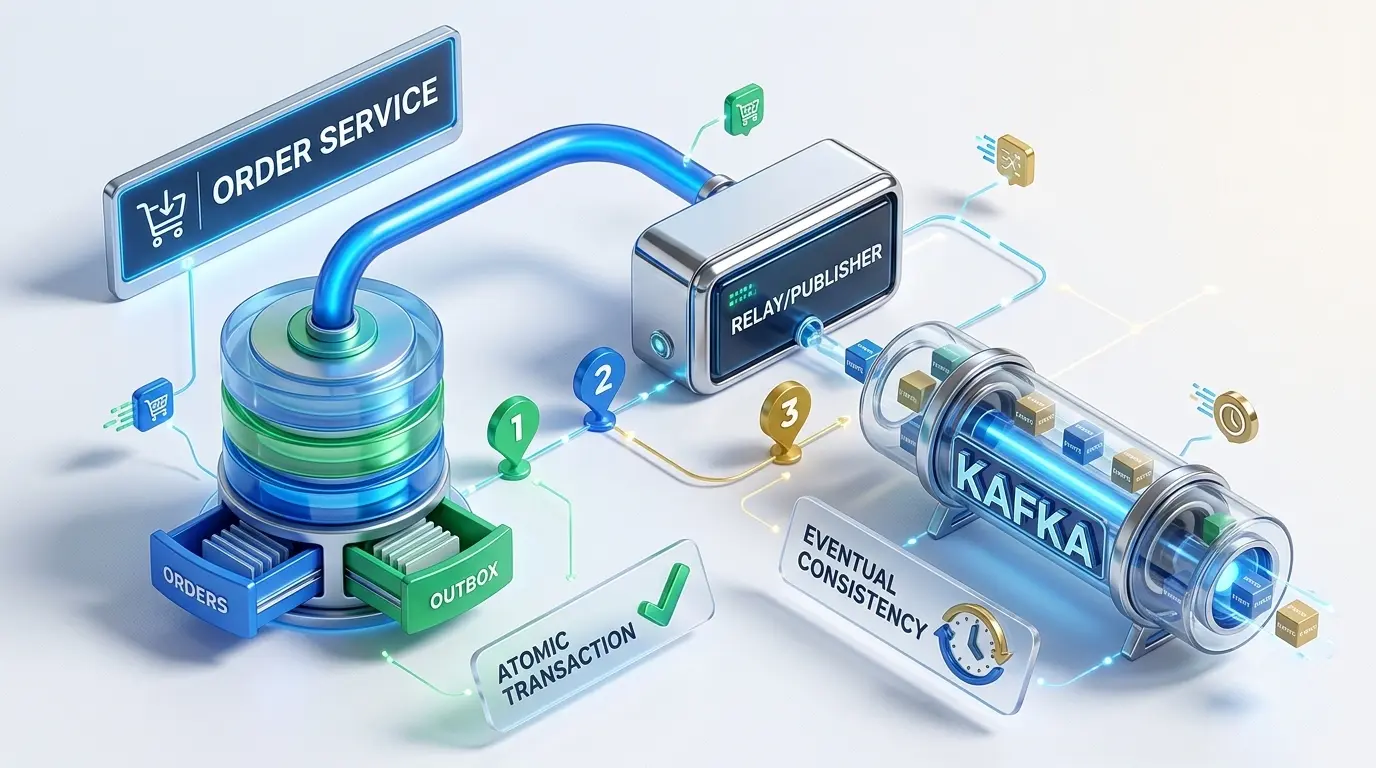
# Executive Summary & TL;DR
Publishing messages to a message broker inside a database transaction is unreliable — if the transaction rolls back after publishing, you have a phantom message; if publishing fails after the transaction commits, you have a lost message. The Transactional Outbox pattern solves this by writing events to a database table within the same transaction as your business data, then relaying committed events asynchronously to your broker.
spring-boot-starter-outbox is a production-ready Spring Boot auto-configuration that implements this pattern with:
- Atomic writes to the database (no dual-write problem)
- Pluggable broker adapters (Kafka, RabbitMQ, or custom)
- Automatic retry with backoff and terminal FAILED state
- Scheduled polling relay (no external coordinator needed)
- Full override support via
@ConditionalOnMissingBean
Add the starter to your build.gradle.kts, write a @Transactional method that saves business data and calls outboxPublisher.publish(), configure your broker, and let the relay handle delivery.
TIP: At-least-once delivery is guaranteed. Consumers must deduplicate using the event
id(UUID). See the Consuming Events section below for consumer implementation examples.
# The Context: Pain Point and Why
# The Dual-Write Problem
In a typical microservice, you have two systems that must stay consistent:
- Your database — the source of truth for business state (orders, users, shipments, etc.)
- Your message broker — the communication channel to other services (Kafka topics, RabbitMQ exchanges)
When a business event occurs (e.g., an order is placed), you naturally want to:
@Transactional
public Order createOrder(CreateOrderRequest req) {
    Order order = orderRepository.save(new Order(req)); // DB
    kafkaProducer.send("orders", order);                 // Broker
    return order;
}
This looks correct, but it has a critical race condition:
- Scenario 1: Broker publish succeeds, then DB transaction rolls back → consumers see an order that never existed (phantom message)
- Scenario 2: DB transaction commits, then broker publish fails → consumers never hear about the order (lost message)
- Scenario 3: Process crashes between the two writes → either phantom or lost message, depending on when
Traditional attempts to fix this are costly:
| Approach | Problem |
|---|---|
| Two-phase commit (2PC) | Broker doesn’t support transactions; 2PC blocks and is slow |
| Distributed transactions | Complex, slow, still vulnerable to failures |
| “Retry logic” | Ad-hoc, hard to test, easily forgotten |
| Event sourcing | Powerful but architectural commitment; overkill for many systems |
# Why the Outbox Pattern
The Outbox pattern elegantly sidesteps the problem:
- Single atomic write: Save both the business entity and the outbox event row in the same database transaction
- Asynchronous relay: A separate scheduler polls the outbox table and publishes committed events to the broker
- Temporal decoupling: The database commit is the source of truth; broker delivery is a separate concern
Key insight: If the database commit succeeds, the outbox row definitely exists. If it fails, neither the business data nor the event row persist — no inconsistency.
# Architectural Benefits
- Exactly-once-ish semantics: Combined with consumer deduplication (via event ID), you achieve at-least-once ✓ exactly-once ✓
- No broker coupling: The service is resilient to broker downtime (events queue in the DB)
- Failure isolation: Broker issues don’t cascade to the business transaction
- Observability: Failed events are recorded in the database with retry counts and error messages
- Partition key preservation: The
aggregateIdbecomes the Kafka partition key, preserving per-entity ordering - Separation of concerns: Database writes are decoupled from message broker concerns via the relay mechanism
- Operational simplicity: No distributed transactions or two-phase commit needed
# Transactional Consistency Guarantee
The pattern provides guaranteed consistency at the database level:
- All-or-nothing: Business data + outbox event persist atomically — either both succeed or both fail (no partial states)
- No phantom messages: If the transaction rolls back, no outbox event is created
- No lost messages: If the transaction commits, the outbox event is guaranteed to exist in the database
- Eventual delivery: Once in the database, the relay process ensures the event eventually reaches the broker
This creates an “eventual consistency” boundary between the database and the message broker, allowing them to maintain strong internal consistency while being loosely coupled externally.
IMPORTANT for Architects: The Outbox pattern is not a substitute for event sourcing. It solves dual-write consistency, not temporal queries or event replay. Use it for reliable event publishing in transaction-based services.
# System Architecture & Data Flow (Architects/DevOps)
# The Outbox Table
All events live in a single table, outbox_events:
CREATE TABLE outbox_events (
    id             UUID          PRIMARY KEY DEFAULT gen_random_uuid(),
    aggregate_type VARCHAR(100)  NOT NULL,           -- e.g., "Order", "User"
    aggregate_id   VARCHAR(255)  NOT NULL,           -- e.g., order ID
    event_type     VARCHAR(100)  NOT NULL,           -- e.g., "ORDER_CREATED"
    payload        TEXT          NOT NULL,           -- JSON
    status         VARCHAR(20)   NOT NULL DEFAULT 'PENDING',  -- PENDING → PROCESSED → FAILED
    retry_count    INTEGER       NOT NULL DEFAULT 0,
    error_message  TEXT,
    created_at     TIMESTAMPTZ   NOT NULL DEFAULT now(),
    processed_at   TIMESTAMPTZ
);

CREATE INDEX idx_outbox_status_created ON outbox_events(status, created_at);
Columns:
id— deduplication key for consumers (required for idempotent processing)aggregate_type/aggregate_id— business routing (which entity owns this event)event_type— event classification (maps to Kafka topic or RabbitMQ routing key)payload— JSON serialization of the domain eventstatus— PENDING (awaiting relay), PROCESSED (successfully delivered), FAILED (exhausted retries)retry_count— attempts so farerror_message— last failure reason (useful for debugging)created_at— when the event was persisted (DB commit time)processed_at— when the relay successfully delivered it
# The Three-Phase Flow
The transactional outbox pattern operates in three distinct phases:
# Phase 1: Atomic Transaction (Synchronous)
- Responsibility: Service + Database
- What happens: Business logic saves its data (e.g., new order) and simultaneously writes the corresponding event to the outbox table
- Guarantee: Both writes are atomic — they succeed together or fail together, with no partial states
- Database ensures: ACID compliance at the transaction boundary
# Phase 2: Relay and Publisher (Asynchronous)
- Responsibility: Outbox Relay Service
- What happens: A scheduled task polls the outbox table for
PENDINGevents and attempts to publish them to the message broker - Guarantee: Eventually publishes every committed event, with automatic retry and backoff logic
- Database tracks: Event status progression (PENDING → PROCESSED or FAILED)
# Phase 3: Message Broker (Asynchronous)
- Responsibility: Kafka / RabbitMQ
- What happens: Events are published to topics/exchanges where downstream consumers can subscribe
- Guarantee: Broker-specific (Kafka: at-least-once with partition ordering; RabbitMQ: broker reliability)
- Consumers handle: Deduplication by event ID to ensure exactly-once processing
Key insight: Phases ① and ② are strongly consistent (database ACID), while the boundary between ② and ③ is eventually consistent (broker asynchrony).
# Data Flow Diagram
# Kafka Version
graph TD
    subgraph Service["Service Layer (Business Logic)"]
        OS["OrderService.createOrder()"]
        TXN["@Transactional Boundary"]
        DBW["Save Order to DB"]
        OUTBOX["Publish Event to Outbox"]
    end

    subgraph Database["PostgreSQL Database"]
        ORDERS["orders table"]
        OUTBOXTBL["outbox_events table<br/>(status=PENDING)"]
    end

    subgraph Relay["OutboxEventRelay (@Scheduled)"]
        POLL["Poll: SELECT WHERE status='PENDING'"]
        SEND["KafkaBrokerAdapter.send()"]
        UPDATE["UPDATE status='PROCESSED'"]
    end

    subgraph Broker["Kafka Broker"]
        TOPIC["topic: outbox.ORDER_CREATED<br/>key: aggregateId"]
    end

    subgraph Consumer["Downstream Services"]
        CS["Consumer Service"]
        DEDUP["Deduplicate by event.id"]
        PROCESS["Process Event"]
    end

    OS --> TXN
    TXN --> DBW
    DBW --> ORDERS
    TXN --> OUTBOX
    OUTBOX --> OUTBOXTBL
    OUTBOXTBL -->|COMMIT| RELAY
    RELAY --> POLL
    POLL -->|Every 5s| SEND
    SEND --> TOPIC
    TOPIC --> CS
    CS --> DEDUP
    DEDUP --> PROCESS

    classDef svc fill:#3b82f6,color:#fff,stroke:#1e40af,stroke-width:2px
    classDef db fill:#10b981,color:#fff,stroke:#065f46,stroke-width:2px
    classDef relay fill:#f59e0b,color:#fff,stroke:#b45309,stroke-width:2px
    classDef broker fill:#8b5cf6,color:#fff,stroke:#5b21b6,stroke-width:2px
    classDef consumer fill:#ec4899,color:#fff,stroke:#831843,stroke-width:2px

    class Service svc
    class Database db
    class Relay relay
    class Broker broker
    class Consumer consumer
# RabbitMQ Version
graph TD
    subgraph Service["Service Layer (Business Logic)"]
        OS["OrderService.createOrder()"]
        TXN["@Transactional Boundary"]
        DBW["Save Order to DB"]
        OUTBOX["Publish Event to Outbox"]
    end

    subgraph Database["PostgreSQL Database"]
        ORDERS["orders table"]
        OUTBOXTBL["outbox_events table<br/>(status=PENDING)"]
    end

    subgraph Relay["OutboxEventRelay (@Scheduled)"]
        POLL["Poll: SELECT WHERE status='PENDING'"]
        SEND["RabbitMqBrokerAdapter.send()"]
        UPDATE["UPDATE status='PROCESSED'"]
    end

    subgraph Broker["RabbitMQ Broker"]
        EXCHANGE["exchange: outbox<br/>(topic type)"]
        QUEUE["queue: order_events"]
    end

    subgraph Consumer["Downstream Services"]
        CS["Consumer Service"]
        DEDUP["Deduplicate by event.id"]
        PROCESS["Process Event"]
    end

    OS --> TXN
    TXN --> DBW
    DBW --> ORDERS
    TXN --> OUTBOX
    OUTBOX --> OUTBOXTBL
    OUTBOXTBL -->|COMMIT| RELAY
    RELAY --> POLL
    POLL -->|Every 5s| SEND
    SEND --> EXCHANGE
    EXCHANGE --> QUEUE
    QUEUE --> CS
    CS --> DEDUP
    DEDUP --> PROCESS

    classDef svc fill:#3b82f6,color:#fff,stroke:#1e40af,stroke-width:2px
    classDef db fill:#10b981,color:#fff,stroke:#065f46,stroke-width:2px
    classDef relay fill:#f59e0b,color:#fff,stroke:#b45309,stroke-width:2px
    classDef broker fill:#8b5cf6,color:#fff,stroke:#5b21b6,stroke-width:2px
    classDef consumer fill:#ec4899,color:#fff,stroke:#831843,stroke-width:2px

    class Service svc
    class Database db
    class Relay relay
    class Broker broker
    class Consumer consumer
BLUE: Service layer | GREEN: Database | AMBER: Relay scheduler | PURPLE: Broker | PINK: Consumers
# Failure Modes & Recovery
| Failure | Handled By |
|---|---|
| DB commit succeeds, broker publish fails | Relay retries on next cycle (automatic recovery) |
| DB transaction rolls back | Event row never inserted; no phantom message |
| Relay crashes mid-cycle | Next cycle picks up PENDING events (idempotent) |
| Broker is down for hours | Events remain PENDING in DB; relay publishes when broker recovers |
| Event permanently malformed | Marked FAILED after max-retries; operator reviews error_message |
| Duplicate delivery | Consumer must deduplicate using event id (UUID) |
NOTE for DevOps: Monitor the outbox table for events stuck in PENDING state (age > 5× relay interval) or accumulating in FAILED state. These are early warning signs of broker issues or payload corruption.
# The Code: Pre-requisites, Implementation & Snippets (Developers)
# Prerequisites
- Spring Boot: 4.x
- Java: 21+
- Spring Data JPA with PostgreSQL (or compatible database with UUID support)
- Message Broker: Apache Kafka or RabbitMQ
- Build Tool: Gradle or Maven
# Installation
Gradle (build.gradle.kts):
dependencies {
    implementation("io.github.saumilp.starters:spring-boot-starter-outbox:1.0.0")

    // Plus your broker dependency:
    implementation("org.springframework.kafka:spring-kafka:3.3.0")
    // or:
    // implementation("org.springframework.boot:spring-boot-starter-amqp:3.2.0")
}
Maven (pom.xml):
<dependency>
    <groupId>io.github.saumilp.starters</groupId>
    <artifactId>spring-boot-starter-outbox</artifactId>
    <version>1.0.0</version>
</dependency>
# Step 1: Create the Outbox Table
Use Flyway or Liquibase to version your schema. Create a migration file (e.g., V1__create_outbox_events.sql):
CREATE TABLE outbox_events (
    id             UUID          PRIMARY KEY DEFAULT gen_random_uuid(),
    aggregate_type VARCHAR(100)  NOT NULL,
    aggregate_id   VARCHAR(255)  NOT NULL,
    event_type     VARCHAR(100)  NOT NULL,
    payload        TEXT          NOT NULL,
    status         VARCHAR(20)   NOT NULL DEFAULT 'PENDING',
    retry_count    INTEGER       NOT NULL DEFAULT 0,
    error_message  TEXT,
    created_at     TIMESTAMPTZ   NOT NULL DEFAULT now(),
    processed_at   TIMESTAMPTZ
);

CREATE INDEX idx_outbox_status_created ON outbox_events(status, created_at);
# Step 2: Configure the Starter
Choose your broker and update application.yml:
# Kafka Configuration
spring:
  datasource:
    url: jdbc:postgresql://localhost:5432/myapp
    username: postgres
    password: postgres
    driver-class-name: org.postgresql.Driver

  jpa:
    hibernate:
      ddl-auto: validate
    show-sql: false

  kafka:
    bootstrap-servers: localhost:9092
    producer:
      key-serializer: org.apache.kafka.common.serialization.StringSerializer
      value-serializer: org.apache.kafka.common.serialization.StringSerializer

  outbox:
    enabled: true
    broker: kafka
    kafka-topic-prefix: "events."  # Topics: events.ORDER_CREATED, events.USER_REGISTERED
    relay-interval-ms: 5000        # Poll every 5 seconds
    max-retries: 5                  # Retry up to 5 times before FAILED
Kafka Behavior:
- Events published to topics:
{prefix}{eventType}(e.g.,events.ORDER_CREATED) aggregateIdbecomes the partition key → guarantees per-entity ordering- Consumers can scale horizontally across partitions
# RabbitMQ Configuration
spring:
  datasource:
    url: jdbc:postgresql://localhost:5432/myapp
    username: postgres
    password: postgres
    driver-class-name: org.postgresql.Driver

  jpa:
    hibernate:
      ddl-auto: validate
    show-sql: false

  rabbitmq:
    host: localhost
    port: 5672
    username: guest
    password: guest

  outbox:
    enabled: true
    broker: rabbitmq
    rabbit-exchange: domain-events       # Exchange name
    relay-interval-ms: 5000
    max-retries: 3
RabbitMQ Behavior:
- Events published to exchange:
{rabbit-exchange}(e.g.,domain-events) - Routing key:
{eventType}(e.g.,ORDER_CREATED) - Consumers bind queues to exchange with routing key patterns
- More flexible routing (topic, fanout, direct exchange types)
TIP: For Kafka, use when you need ordering guarantees per partition key and distributed stream processing. For RabbitMQ, use when you need flexible routing and message acknowledgments. Both are fully supported by the starter.
# Step 3: Implement Your Service
Inject OutboxEventPublisher and call publish() inside a @Transactional method:
package com.example.order;

import io.github.saumilp.starters.outbox.publisher.OutboxEventPublisher;
import org.springframework.stereotype.Service;
import org.springframework.transaction.annotation.Transactional;
import com.fasterxml.jackson.databind.ObjectMapper;

@Service
public class OrderService {

    private final OrderRepository orderRepository;
    private final OutboxEventPublisher outboxPublisher;
    private final ObjectMapper objectMapper;

    public OrderService(
        OrderRepository orderRepository,
        OutboxEventPublisher outboxPublisher,
        ObjectMapper objectMapper
    ) {
        this.orderRepository = orderRepository;
        this.outboxPublisher = outboxPublisher;
        this.objectMapper = objectMapper;
    }

    @Transactional
    public Order createOrder(CreateOrderRequest request) {
        // 1. Save the order to the database
        Order order = orderRepository.save(new Order(request));

        // 2. Atomically persist an outbox event in the SAME transaction
        outboxPublisher.publish(
            "Order",                                          // aggregateType
            order.getId().toString(),                         // aggregateId (partition key)
            "ORDER_CREATED",                                  // eventType
            objectMapper.writeValueAsString(order)            // payload (JSON)
        );

        return order;
    }

    @Transactional
    public Order shipOrder(String orderId) {
        Order order = orderRepository.findById(orderId)
            .orElseThrow(() -> new OrderNotFoundException(orderId));

        order.setStatus("SHIPPED");
        orderRepository.save(order);

        // Publish shipment event
        outboxPublisher.publish(
            "Order",
            orderId,
            "ORDER_SHIPPED",
            objectMapper.writeValueAsString(order)
        );

        return order;
    }
}
REST Controller:
package com.example.order;

import org.springframework.http.HttpStatus;
import org.springframework.web.bind.annotation.*;

@RestController
@RequestMapping("/orders")
public class OrderController {

    private final OrderService orderService;

    public OrderController(OrderService orderService) {
        this.orderService = orderService;
    }

    @PostMapping
    public Order createOrder(@RequestBody CreateOrderRequest request) {
        return orderService.createOrder(request);
    }

    @PostMapping("/{orderId}/ship")
    public Order shipOrder(@PathVariable String orderId) {
        return orderService.shipOrder(orderId);
    }
}
Request/Response (JSON):
POST /orders
Content-Type: application/json

{
  "customerId": "cust-123",
  "items": [
    { "productId": "prod-456", "quantity": 2 }
  ],
  "totalAmount": 99.99
}

// Response:
{
  "id": "order-789",
  "customerId": "cust-123",
  "status": "CREATED",
  "totalAmount": 99.99,
  "createdAt": "2026-07-05T10:30:00Z"
}
# Step 4: Configure a Custom Broker Adapter (Optional)
If you want to publish to SNS, SQS, Pulsar, or another broker, implement MessageBrokerAdapter:
package com.example.outbox;

import io.github.saumilp.starters.outbox.broker.MessageBrokerAdapter;
import io.github.saumilp.starters.outbox.model.OutboxEvent;
import org.springframework.boot.autoconfigure.condition.ConditionalOnMissingBean;
import org.springframework.stereotype.Component;
import software.amazon.awssdk.services.sns.SnsClient;
import software.amazon.awssdk.services.sns.model.PublishRequest;
import software.amazon.awssdk.services.sns.model.PublishResponse;

@Component
@ConditionalOnMissingBean(MessageBrokerAdapter.class)
public class SnsMessageBrokerAdapter implements MessageBrokerAdapter {

    private final SnsClient snsClient;
    private final String topicArn;

    public SnsMessageBrokerAdapter(SnsClient snsClient, String topicArn) {
        this.snsClient = snsClient;
        this.topicArn = topicArn;
    }

    @Override
    public void send(OutboxEvent event) throws Exception {
        PublishRequest request = PublishRequest.builder()
            .topicArn(topicArn)
            .message(event.getPayload())
            .messageAttributes(Map.of(
                "eventType", MessageAttributeValue.builder()
                    .stringValue(event.getEventType())
                    .dataType("String")
                    .build()
            ))
            .build();

        PublishResponse response = snsClient.publish(request);
        System.out.println("Published to SNS: " + response.messageId());
    }
}
# Consuming Events
# Deduplication Example
# Kafka Consumer with Idempotency
package com.example.order.consumer;

import org.springframework.kafka.annotation.KafkaListener;
import org.springframework.stereotype.Service;
import com.example.order.OrderEvent;

@Service
public class OrderEventConsumer {

    private final OrderEventRepository eventRepository;
    private final NotificationService notificationService;

    @KafkaListener(topics = "events.ORDER_CREATED")
    public void handleOrderCreated(OrderEvent event) {
        // 1. Check if this event ID was already processed (deduplication)
        if (eventRepository.existsByEventId(event.getId())) {
            System.out.println("Event already processed: " + event.getId());
            return; // Idempotent: skip duplicate
        }

        // 2. Process the event
        System.out.println("New order created: " + event.getOrderId());
        notificationService.sendOrderConfirmation(event.getCustomerId());

        // 3. Record that we processed this event ID
        eventRepository.save(new ProcessedEvent(event.getId()));
    }
}
application.yml (Kafka consumer):
spring:
  kafka:
    consumer:
      bootstrap-servers: localhost:9092
      group-id: order-service-consumer
      key-deserializer: org.apache.kafka.common.serialization.StringDeserializer
      value-deserializer: org.springframework.kafka.support.serializer.JsonDeserializer
      properties:
        spring.json.type.mapping: "event:com.example.order.OrderEvent"
      auto-offset-reset: earliest
# RabbitMQ Consumer with Idempotency
package com.example.order.consumer;

import org.springframework.amqp.rabbit.annotation.RabbitListener;
import org.springframework.stereotype.Service;
import com.example.order.OrderEvent;

@Service
public class OrderEventRabbitConsumer {

    private final OrderEventRepository eventRepository;
    private final NotificationService notificationService;

    @RabbitListener(queues = "order-events-queue")
    public void handleOrderCreated(OrderEvent event) {
        // 1. Check if this event ID was already processed (deduplication)
        if (eventRepository.existsByEventId(event.getId())) {
            System.out.println("Event already processed: " + event.getId());
            return; // Idempotent: skip duplicate
        }

        // 2. Process the event
        System.out.println("New order created: " + event.getOrderId());
        notificationService.sendOrderConfirmation(event.getCustomerId());

        // 3. Record that we processed this event ID
        eventRepository.save(new ProcessedEvent(event.getId()));
    }
}
RabbitMQ Queue Setup (Spring Configuration):
package com.example.order.config;

import org.springframework.amqp.core.*;
import org.springframework.context.annotation.Bean;
import org.springframework.context.annotation.Configuration;

@Configuration
public class RabbitMqConfig {

    public static final String EXCHANGE_NAME = "domain-events";
    public static final String QUEUE_NAME = "order-events-queue";
    public static final String ROUTING_KEY = "ORDER_*";  // Wildcard routing

    @Bean
    public TopicExchange orderExchange() {
        return new TopicExchange(EXCHANGE_NAME, true, false);
    }

    @Bean
    public Queue orderQueue() {
        return new Queue(QUEUE_NAME, true);  // Durable queue
    }

    @Bean
    public Binding binding(Queue orderQueue, TopicExchange orderExchange) {
        return BindingBuilder.bind(orderQueue)
            .to(orderExchange)
            .with(ROUTING_KEY);
    }
}
application.yml (RabbitMQ consumer):
spring:
  rabbitmq:
    host: localhost
    port: 5672
    username: guest
    password: guest
    listener:
      simple:
        acknowledge-mode: manual  # Manual ack for reliability
        prefetch: 1               # Process one message at a time
TIP: Store processed event IDs in a cache (Redis) or a dedicated
processed_eventstable. This ensures exactly-once semantics combined with the outbox pattern. For RabbitMQ, use manual acknowledgment (acknowledge-mode: manual) to guarantee message processing reliability.
# Consumer Idempotency Patterns
Since the outbox pattern provides at-least-once delivery, consumers must be idempotent. Here are common strategies:
# Pattern 1: Deduplicate in-memory (for low-traffic services)
private final Set<UUID> processedEventIds = Collections.synchronizedSet(new HashSet<>());

@KafkaListener(topics = "events.ORDER_CREATED")
public void handleOrder(OrderEvent event) {
    if (processedEventIds.contains(event.getId())) {
        return; // Duplicate, skip
    }

    // Process event
    processOrder(event);

    // Mark as processed
    processedEventIds.add(event.getId());
}
⚠️ Limitation: In-memory set is lost on restart → not suitable for production
# Pattern 2: Store in database (recommended for reliability)
@KafkaListener(topics = "events.ORDER_CREATED")
public void handleOrder(OrderEvent event) {
    // Idempotent: will fail silently if event already processed
    try {
        eventStore.recordProcessing(event.getId(), LocalDateTime.now());
    } catch (DuplicateKeyException e) {
        return; // Already processed
    }

    // Safe to process
    processOrder(event);
}
Schema:
CREATE TABLE processed_events (
    event_id UUID PRIMARY KEY,
    processed_at TIMESTAMP NOT NULL,
    source_topic VARCHAR(100)
);
# Pattern 3: Idempotent business operations (best)
@KafkaListener(topics = "events.ORDER_CREATED")
public void handleOrder(OrderEvent event) {
    // Use event ID as idempotency key in the business operation
    Order order = orderRepository.findByExternalEventId(event.getId());

    if (order != null) {
        return; // Already processed
    }

    // Safe to process with idempotency guarantee
    createOrder(event);
}
This is the most resilient approach because idempotency is built into the business logic, not added as an afterthought.
# Pattern 4: Use database constraints (clever approach)
-- Unique constraint on event ID prevents duplicates at the DB level
CREATE TABLE order_events (
    id SERIAL PRIMARY KEY,
    event_id UUID UNIQUE NOT NULL,
    order_id UUID NOT NULL,
    processed_at TIMESTAMP NOT NULL
);@KafkaListener(topics = "events.ORDER_CREATED")
@Transactional
public void handleOrder(OrderEvent event) {
try {
// This will fail with constraint violation if duplicate
eventRepository.save(new ProcessedEvent(event.getId(), ...));
processOrder(event);
} catch (DataIntegrityViolationException e) {
// Duplicate event, already processed
log.warn("Duplicate event: {}", event.getId());
}
}Choose the pattern based on your needs:
- High-traffic systems: Pattern 3 (idempotent business operations)
- Critical systems: Pattern 2 (database deduplication table)
- Simple services: Pattern 4 (database constraints)
- Development/testing: Pattern 1 (in-memory)
# The Infrastructure: CI/CD & Deploy (DevOps)
# Docker Compose for Local Development
Choose your broker setup below:
# Kafka Setup
Create docker-compose.yml:
version: "3.9"

services:
  postgres:
    image: postgres:16-alpine
    environment:
      POSTGRES_DB: order_service
      POSTGRES_USER: postgres
      POSTGRES_PASSWORD: postgres
    ports:
      - "5432:5432"
    volumes:
      - postgres_data:/var/lib/postgresql/data

  kafka:
    image: confluentinc/cp-kafka:7.6.0
    depends_on:
      - zookeeper
    environment:
      KAFKA_BROKER_ID: 1
      KAFKA_ZOOKEEPER_CONNECT: zookeeper:2181
      KAFKA_ADVERTISED_LISTENERS: PLAINTEXT://kafka:29092,PLAINTEXT_HOST://kafka:9092
      KAFKA_LISTENER_SECURITY_PROTOCOL_MAP: PLAINTEXT:PLAINTEXT,PLAINTEXT_HOST:PLAINTEXT
      KAFKA_INTER_BROKER_LISTENER_NAME: PLAINTEXT
      KAFKA_OFFSETS_TOPIC_REPLICATION_FACTOR: 1
    ports:
      - "9092:9092"

  zookeeper:
    image: confluentinc/cp-zookeeper:7.6.0
    environment:
      ZOOKEEPER_CLIENT_PORT: 2181

volumes:
  postgres_data:
# RabbitMQ Setup
Create docker-compose.yml:
version: "3.9"

services:
  postgres:
    image: postgres:16-alpine
    environment:
      POSTGRES_DB: order_service
      POSTGRES_USER: postgres
      POSTGRES_PASSWORD: postgres
    ports:
      - "5432:5432"
    volumes:
      - postgres_data:/var/lib/postgresql/data

  rabbitmq:
    image: rabbitmq:3.13-management-alpine
    environment:
      RABBITMQ_DEFAULT_USER: guest
      RABBITMQ_DEFAULT_PASS: guest
    ports:
      - "5672:5672"      # AMQP port
      - "15672:15672"    # Management UI (http://localhost:15672)
    volumes:
      - rabbitmq_data:/var/lib/rabbitmq

volumes:
  postgres_data:
  rabbitmq_data:
Start services:
docker compose up -dTIP: For RabbitMQ, access the management UI at http://localhost:15672 (guest/guest) to visualize exchanges, queues, and message flow.
# Running the Example Application
The spring-boot-starters repo includes an outbox-example application demonstrating the pattern end-to-end.
Prerequisites:
- Java 21
- Docker + Docker Compose
Step-by-step:
# Clone the repository
git clone https://github.com/SaumilP/spring-boot-starters.git
cd spring-boot-starters

# Start PostgreSQL and Kafka
docker compose up -d

# Build the example
./gradlew :examples:outbox-example:build

# Run the example application
./gradlew :examples:outbox-example:bootRun
The application starts on http://localhost:8080.
# Testing the Outbox Flow
1. Create an order (triggers outbox publish):
curl -X POST http://localhost:8080/orders \
  -H "Content-Type: application/json" \
  -d '{
    "orderId": "order-123",
    "details": "2x Widget A, 1x Widget B"
  }'

# Response:
# {"orderId":"order-123","status":"PLACED","message":"Order placed and outbox event queued"}
2. Verify the order in PostgreSQL:
docker exec -it $(docker ps | grep postgres | awk '{print $1}') \
  psql -U postgres -d outbox_example -c "SELECT * FROM orders;"
3. Verify the event in the outbox table:
docker exec -it $(docker ps | grep postgres | awk '{print $1}') \
  psql -U postgres -d outbox_example -c \
  "SELECT id, event_type, status, created_at FROM outbox_events ORDER BY created_at DESC LIMIT 5;"
Expected output (before relay processes):
                  id                  |  event_type  | status  |         created_at
--------------------------------------+--------------+---------+----------------------------
 550e8400-e29b-41d4-a716-446655440000 | ORDER_PLACED | PENDING | 2026-07-05 10:30:00.000000
4. Wait ~5 seconds (relay interval), then check again:
# In the same terminal, you'll see relay logs:
# 2026-07-05T10:30:05 - Relaying 1 pending outbox events

docker exec -it $(docker ps | grep postgres | awk '{print $1}') \
  psql -U postgres -d outbox_example -c \
  "SELECT id, event_type, status, processed_at FROM outbox_events WHERE id='550e8400-e29b-41d4-a716-446655440000';"
Status should now be PROCESSED.
5. Verify the message in the broker:
# Kafka Verification
# List Kafka topics
docker exec -it $(docker ps | grep kafka | grep -v zookeeper | awk '{print $1}') \
  kafka-topics --bootstrap-server localhost:9092 --list

# Consume ORDER_PLACED events
docker exec -it $(docker ps | grep kafka | grep -v zookeeper | awk '{print $1}') \
  kafka-console-consumer \
    --bootstrap-server localhost:9092 \
    --topic example.Order \
    --from-beginning
You should see the order JSON:
{"orderId":"order-123","details":"2x Widget A, 1x Widget B","status":"PLACED"}# RabbitMQ Verification
# Access RabbitMQ Management UI
open http://localhost:15672
# Login: guest / guest

# View exchanges and queues in the UI, OR use the command line:
docker exec -it $(docker ps | grep rabbitmq | awk '{print $1}') \
  rabbitmqctl list_exchanges

docker exec -it $(docker ps | grep rabbitmq | awk '{print $1}') \
  rabbitmqctl list_queues

# Alternatively, use curl to inspect via HTTP API:
curl -u guest:guest http://localhost:15672/api/exchanges
curl -u guest:guest http://localhost:15672/api/queues
The RabbitMQ Management UI provides a visual interface to see:
- Exchanges:
outbox(or your configured exchange) - Queues bound to the exchange
- Message count in each queue
- Published/consumed message rates
# CI/CD Pipeline (GitHub Actions Example)
Create .github/workflows/ci.yml:
name: CI/CD

on:
  push:
    branches: [ main ]
  pull_request:
    branches: [ main ]

jobs:
  test:
    runs-on: ubuntu-latest
    services:
      postgres:
        image: postgres:16-alpine
        env:
          POSTGRES_DB: test_db
          POSTGRES_USER: postgres
          POSTGRES_PASSWORD: postgres
        options: >-
          --health-cmd pg_isready
          --health-interval 10s
          --health-timeout 5s
          --health-retries 5
        ports:
          - 5432:5432

      kafka:
        image: confluentinc/cp-kafka:7.6.0
        env:
          KAFKA_ZOOKEEPER_CONNECT: zookeeper:2181
          KAFKA_BROKER_ID: 1

    steps:
      - uses: actions/checkout@v4

      - name: Set up JDK 21
        uses: actions/setup-java@v4
        with:
          java-version: '21'
          distribution: 'temurin'

      - name: Run tests
        run: ./gradlew test

      - name: Build application
        run: ./gradlew build

  deploy:
    needs: test
    runs-on: ubuntu-latest
    if: github.ref == 'refs/heads/main' && github.event_name == 'push'

    steps:
      - uses: actions/checkout@v4

      - name: Set up JDK 21
        uses: actions/setup-java@v4
        with:
          java-version: '21'
          distribution: 'temurin'

      - name: Build Docker image
        run: docker build -t myapp:${{ github.sha }} .

      - name: Push to registry
        run: |
          docker tag myapp:${{ github.sha }} myapp:latest
          docker push myapp:latest

      - name: Deploy to production
        run: |
          # Your deployment logic here (kubectl apply, docker pull, etc.)
          echo "Deploying myapp:${{ github.sha }}"
# Monitoring & Alerts (Prometheus/Grafana)
Export metrics from the outbox relay:
The starter exposes Spring Actuator metrics. Enable them in application.yml:
management:
  endpoints:
    web:
      exposure:
        include: health,metrics,prometheus
  metrics:
    export:
      prometheus:
        enabled: true
Key metrics to monitor:
outbox.events.pending— count of PENDING events (should be near 0 in steady state)outbox.events.failed— count of FAILED events (alert if > 0)outbox.relay.duration— relay execution time (should be < relay-interval-ms)outbox.relay.errors— count of relay errors
Prometheus scrape config:
scrape_configs:
  - job_name: 'order-service'
    static_configs:
      - targets: ['localhost:8080']
    metrics_path: '/actuator/prometheus'
Grafana dashboard query (example):
# Show PENDING events over time
increase(outbox_events_pending[5m])

# Alert: too many FAILED events
outbox_events_failed > 10
WARNING for DevOps: Events stuck in PENDING for > 30 minutes likely indicate broker connectivity issues. Set up an alert:
outbox_events_pending > 100 AND (time() - outbox_events_created_timestamp) > 1800
# Key Takeaways & Lessons Learned (All Audiences)
# For Architects
The Outbox pattern solves dual-write consistency — write business data and events atomically in a single DB transaction. No phantom or lost messages.
At-least-once delivery is a contract between the outbox and the broker — the relay guarantees it will try to publish every committed event. Consumers are responsible for deduplication.
Not a replacement for event sourcing — the Outbox pattern records intent to publish (side effects), not the full event log. Use event sourcing if you need temporal queries or event replay.
Temporal decoupling is powerful — the service doesn’t care when (or if) the broker receives the event. This isolates transient broker issues from your business logic.
Scaling outbox relay is simple — because there’s no coordination between relay instances, you can scale horizontally by running multiple instances (each polling the same table with different PENDING events).
# For Developers
Always call
outboxPublisher.publish()inside@Transactionalmethods — events published outside a transaction are orphaned.Use
aggregateIdas a meaningful business identifier — it becomes the Kafka partition key, so all events for the same entity maintain order.Payload should be JSON, not Java serialized — it ensures cross-language consumers can understand the event.
Test transaction rollback scenarios — create a test where an exception is thrown after publishing to the outbox, verify the event row is rolled back too.
Implement consumer deduplication with event ID — Redis, a cache, or a
processed_eventstable. Without it, duplicate delivery breaks idempotency.
# For DevOps
Monitor the outbox table for stalled events — set up alerts for events older than 5× the relay interval without moving to PROCESSED.
Failed events are permanent records — they’re not automatically cleaned up. Set up a job to archive or delete events older than, say, 30 days.
The relay is just a scheduled task — no special orchestration needed. If it crashes, the next instance picks up where it left off.
Database load is predictable — the relay makes one SELECT per cycle, plus one UPDATE per processed event. With 5-second intervals, you get 12 SELECTs/min.
Kafka/RabbitMQ downtime is not a crisis — events remain PENDING in the database. Monitor broker health and react to reconnection delays, but don’t panic.
# Best Practices
✅ DO:
- Serialize events as self-contained JSON (no forward references)
- Include event IDs in consumer state (for deduplication)
- Monitor outbox table age and FAILED count
- Use a database-agnostic UUID for event ID
- Test both the happy path and retry logic
- For Kafka: use
aggregateIdas the partition key for ordering guarantees - For RabbitMQ: use wildcard routing patterns for flexible message distribution
❌ DON’T:
- Publish events outside a
@Transactionalmethod - Assume single-delivery semantics without consumer deduplication
- Use Outbox as a replacement for event sourcing
- Ignore error_message field (it’s crucial for debugging)
- Run multiple relay instances without an index on (status, created_at)
- For Kafka: don’t rely on topic ordering without partition keys; use
aggregateId - For RabbitMQ: don’t hardcode queue names in code; use configuration + dynamic queue declaration
# Broker Comparison: Kafka vs. RabbitMQ
| Feature | Kafka | RabbitMQ |
|---|---|---|
| Ordering Guarantee | Per partition (use aggregateId as key) | Per queue (but less strict) |
| Scalability | Horizontal (many partitions) | Vertical (queue mirroring) |
| Message Retention | Configurable (log-based) | Until consumed (queue-based) |
| Routing | Topic-based (simple) | Exchange types (flexible) |
| Consumer Lag | Visible, trackable | Less visible |
| Setup Complexity | Moderate (Zookeeper/KRaft) | Lower (simpler) |
| Use Case | High throughput, event stream, analytics | Traditional messaging, task queues |
Use Kafka if: You need ordering per entity, stream processing, or event log replay
Use RabbitMQ if: You need flexible routing, simpler operations, or traditional request-reply patterns
# Reference & Further Reading
Official Repository:
🔗 github.com/SaumilP/spring-boot-starters/tree/main/spring-boot-starter-outbox
Example Application:
🔗 github.com/SaumilP/spring-boot-starters/tree/main/examples/outbox-example
Papers & Articles:
- Chris Richardson — The Outbox Pattern
- Debezium — The Outbox Pattern
- AWS — Using the Transactional Outbox Pattern
Related Patterns:
- Event Sourcing — full temporal record of state changes
- CQRS — separate read and write models
- Saga Pattern — distributed transactions via choreography or orchestration
# Troubleshooting
# Q: Events are stuck in PENDING status
A: Check broker connectivity. Verify bootstrap servers, firewall rules, and broker logs. The relay will retry automatically, but if the broker is down for a long time, events accumulate in the outbox.
# Q: “Transaction already rolled back” error when calling publish()
A: Ensure publish() is called inside a @Transactional method or within an active transaction boundary. If called outside a transaction, the event row will not persist.
# Q: Duplicate messages in the broker
A: This is expected with at-least-once semantics. Consumers must implement deduplication using the event id (UUID). Refer to the Consuming Events section for full consumer implementation examples with deduplication logic.
# Q: Relay is taking too long (> relay-interval-ms)
A: The index on (status, created_at) is missing, or you have thousands of FAILED events. Check the index and consider archiving old FAILED events.
Have questions or feedback? Open an issue on GitHub or reach out on the project’s discussions board.
Last updated: July 5, 2026